How to perform Single and Bulk NPR action on New UI?
This article explains how to manage NPR (Non-Pickup Report) shipments in the New eShipz UI.
The NPR section gives you complete visibility of shipments that are under pickup exception due to various pickup issues. It helps you:
- Helps identify shipments that were not picked up on time
- Allows quick action to prevent delivery delays
- Improves operational efficiency
- Provides better visibility into pickup failures
You can manage NPRs either individually (Single Action) or in bulk.
Single NPR action
1. Login to your eShipz account.
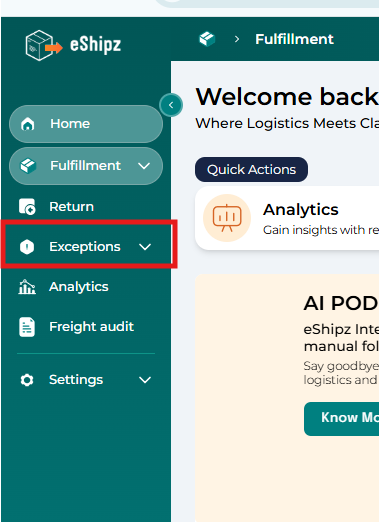
2. From the left panel, click on Exceptions.
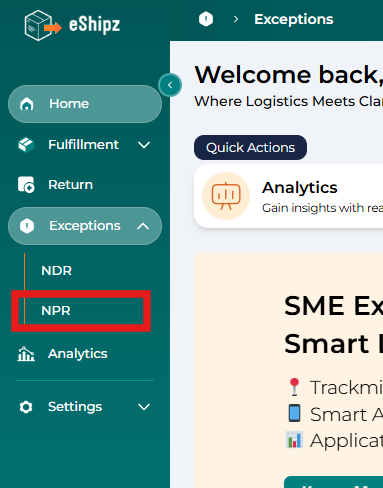
3. Select NPR under Exceptions.
4. Under the Action Required tab, locate the shipment that needs action.
5. Click the double arrow (>>) button on the right side of that shipment.
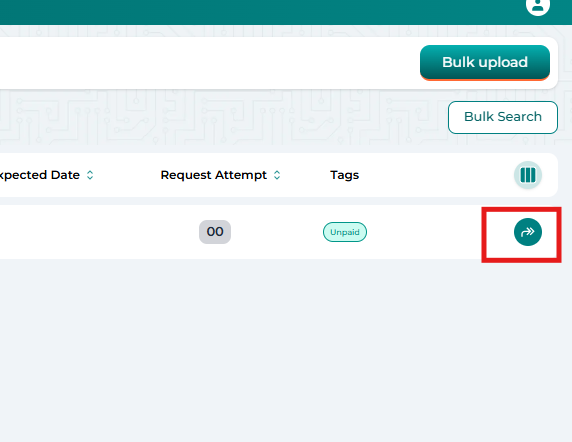
6. You will see the following NPR action options:
- Reschedule
- Edit and re-schedule
- Cancel
7. Select the required action, make necessary updates, and click Confirm.
8. Once submitted, the shipment will move to the Action Requested tab.
Bulk NPR action
You can manage multiple failed deliveries at once by downloading, updating, and re-uploading the NDR file.
Steps to Perform Bulk NPR:
1. Click on the Bulk Upload option on the right side of the NPR page.
2. Click the Download NPR button.
3. Select the required date range.
4. Download the Excel file containing failed delivery (NPR) shipments.
5. Open the file and update the required fields such as:
- Action (Re-schedule / Edit details / Cancel)
- Phone number
- Name
- Address
- Pincode
- Pickup date and time
6. Save the updated Excel file.
7. Upload the file back into the system.
7. Upload the file back into the system.
Once uploaded successfully, bulk NPR actions will be processed automatically.
Understanding the NPR Page View
The NPR page provides multiple filters and tabs to help you manage shipments efficiently.
Available Tabs:
- Action Required – Shipments awaiting action
- Action Requested – Shipments for which NPR action has been submitted
- Pickup – Successfully shipments Pickedup after NPR
Available Filters:
- Date
- Tracking Status
- Slug
These options help you quickly track pending actions, monitor progress, and gain operational insights.
Important Tip
Regularly monitor the Action Required tab to avoid delays in reattempts or returns. Timely NDR actions help improve delivery success rates and customer satisfaction.
For a detailed step-by-step guide, please visit the link Click here.